


Save Your AI Chats to Obsidian or Notion
Last week, ChatGPT helped you work out a good plan. Today you need it again, but the conversation is buried among dozens of vague titles. Once you find it, you still have to copy the text, clean up the formatting and move it into your notes.
Saving useful AI conversations in Obsidian or Notion puts them alongside your projects, reading notes and work records. This guide covers exporting, importing, organizing and reusing them. Start with one conversation worth keeping; you do not need to move your entire history at once.
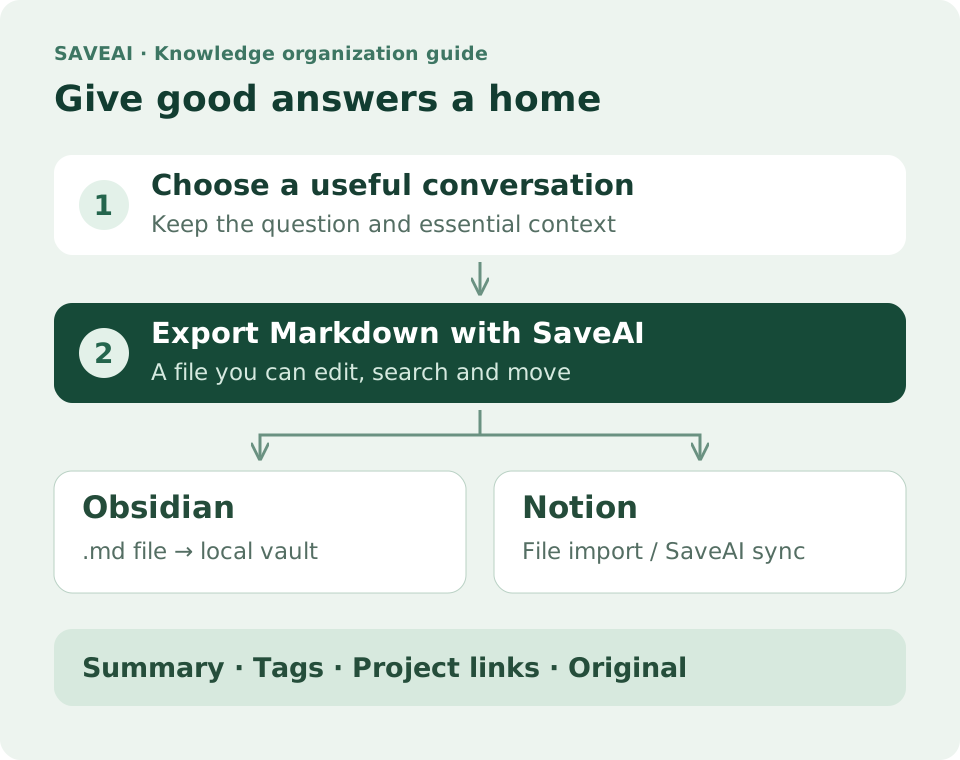
1. Choose a home: Obsidian or Notion?
If you already keep your notes in one of these tools, continue with it. The best destination is somewhere you actually revisit. Here are common ways to organize your conversations.
| Need | Obsidian | Notion |
|---|---|---|
| Where files go | Put .md files in a local vault | Import .md files or sync with SaveAI |
| How to organize | Connect notes with folders, tags and internal links | Organize material with pages, database properties and views |
| Typical uses | Personal research, study notes and debugging records | Project libraries, team sharing and task follow-up |
Markdown works for both routes. It represents headings, lists, links and code blocks and remains easy to edit. Fonts, background colors and platform-specific layouts are not its main purpose. Check content and structure after import rather than expecting a perfect copy of the chat page.
2. Export a useful conversation with SaveAI
- Open the original chat. Go to a supported AI site and open the conversation. If the SaveAI entry is missing after installation, refresh the page.
- Choose the scope. Export the whole conversation or open the message picker and select the turns you need. Keep the question and essential answers together so the answer retains its context.
- Select Markdown. Save the
.mdfile with a meaningful name, such as2026-10-12_ChatGPT_Customer-interview-plan.md. - Check the result. Confirm important paragraphs, code, tables and image references. Enable the source-link setting or add the original conversation URL yourself when you need traceability.
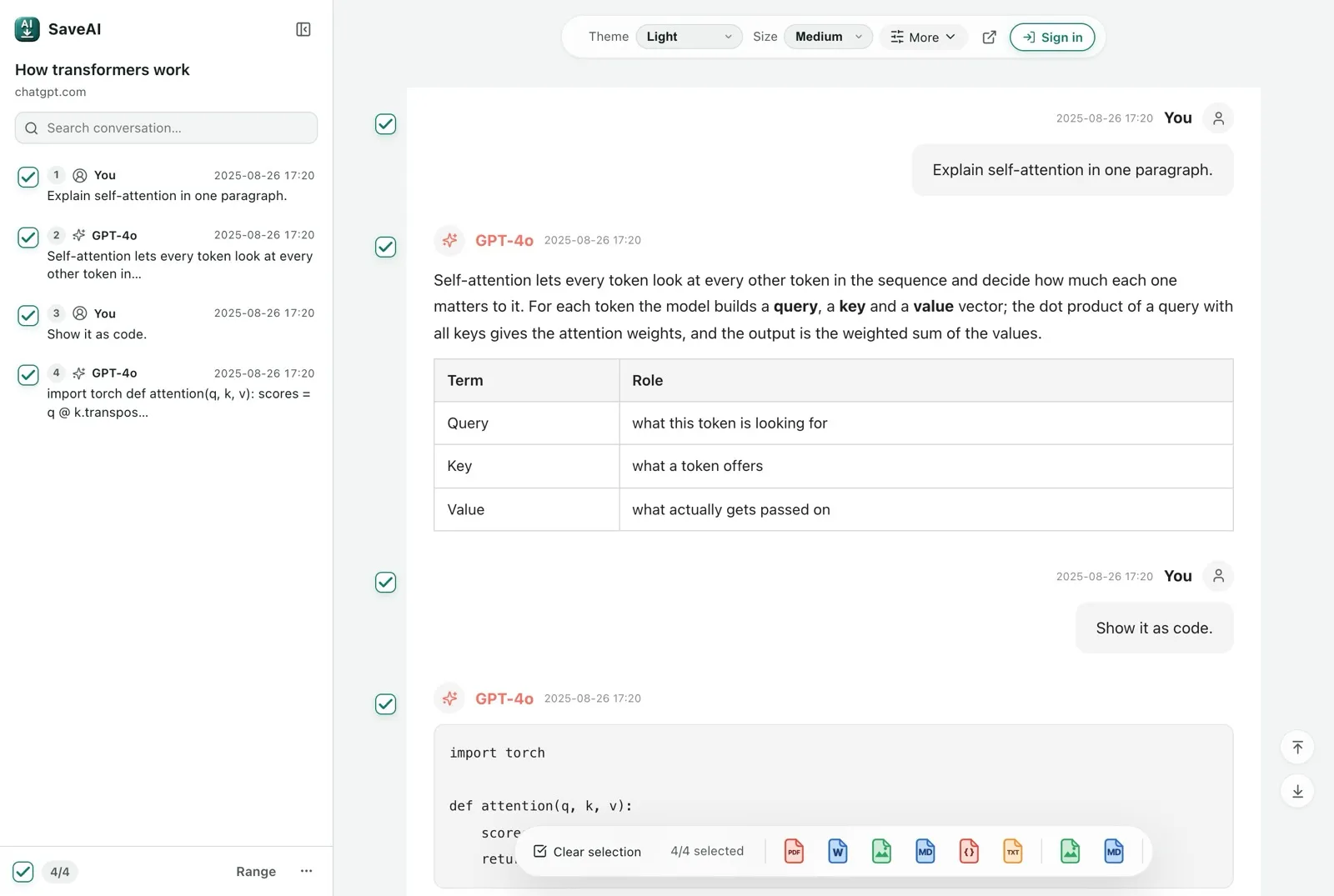
For a ten-turn debugging discussion, keep the environment and error, investigation, final fix and verification. Saving only the last code snippet makes it easy to forget why you changed it.
3. Turn the conversation into an Obsidian note
1. Move the file into your vault
Create an AI conversations folder in your current vault. Drag the exported .md into Obsidian’s file explorer, or move it into the vault with Finder or your system file browser. Obsidian uses Markdown notes, so no extra format conversion is needed.
Keep the directory simple: put new files in an inbox, then move reviewed notes to the relevant project. You do not need a separate complex hierarchy for every AI service.
My knowledge base/
├── AI conversations/
│   ├── Inbox/
│   │   └── 2026-10-12_ChatGPT_Customer interview plan.md
│   └── Reviewed/
├── Projects/
│   └── User research.md
└── Attachments/
2. Add a summary and a connection
Above the original text, add two or three sentences explaining the question, useful conclusions and next action. Add a few topic tags, such as #AI-chats and #user-research, and link to an existing project note with [[User research]].
Your project note then becomes an entry point into the AI discussion. Searching by topic also becomes easier. Reuse a small set of descriptive tags instead of creating new ones for every note.
3. Optional: add properties for filtering
To filter by service, date or topic, you can manually add YAML properties at the very beginning of the file. The example below is a suggested organization step, not a fixed header automatically added to every ordinary Markdown export.
Obsidian: properties---
title: Customer interview plan
source: ChatGPT
archived: 2026-10-12
tags:
- AI-chats
- User-research
---Here, archived means the archive date. Record a verified conversation date separately; do not assume the download date is when the chat began. For official Claude data exports, the export reader described in the linked guide supports optional frontmatter.
4. Bring it into Notion: import or sync
Method A: import a Markdown file
- In Notion on desktop or the web, open Settings → Import.
- Select Text & Markdown and upload the
.mdfile exported by SaveAI. - Open the new page, check headings, lists and code blocks, then move it into your project or library.
File import explicitly tells Notion to parse Markdown. Pasting raw Markdown can produce different results depending on what you copied and how you pasted it. If symbols such as ## remain unconverted, use file import. Nonstandard Markdown and anchor links also have limitations.
Method B: sync directly from SaveAI
For repeated exports to one workspace, use the Notion destination in the SaveAI popup. Sign in, connect and authorize Notion, select an accessible page or database, then click Sync to Notion. Start with a short conversation to confirm the destination and result.
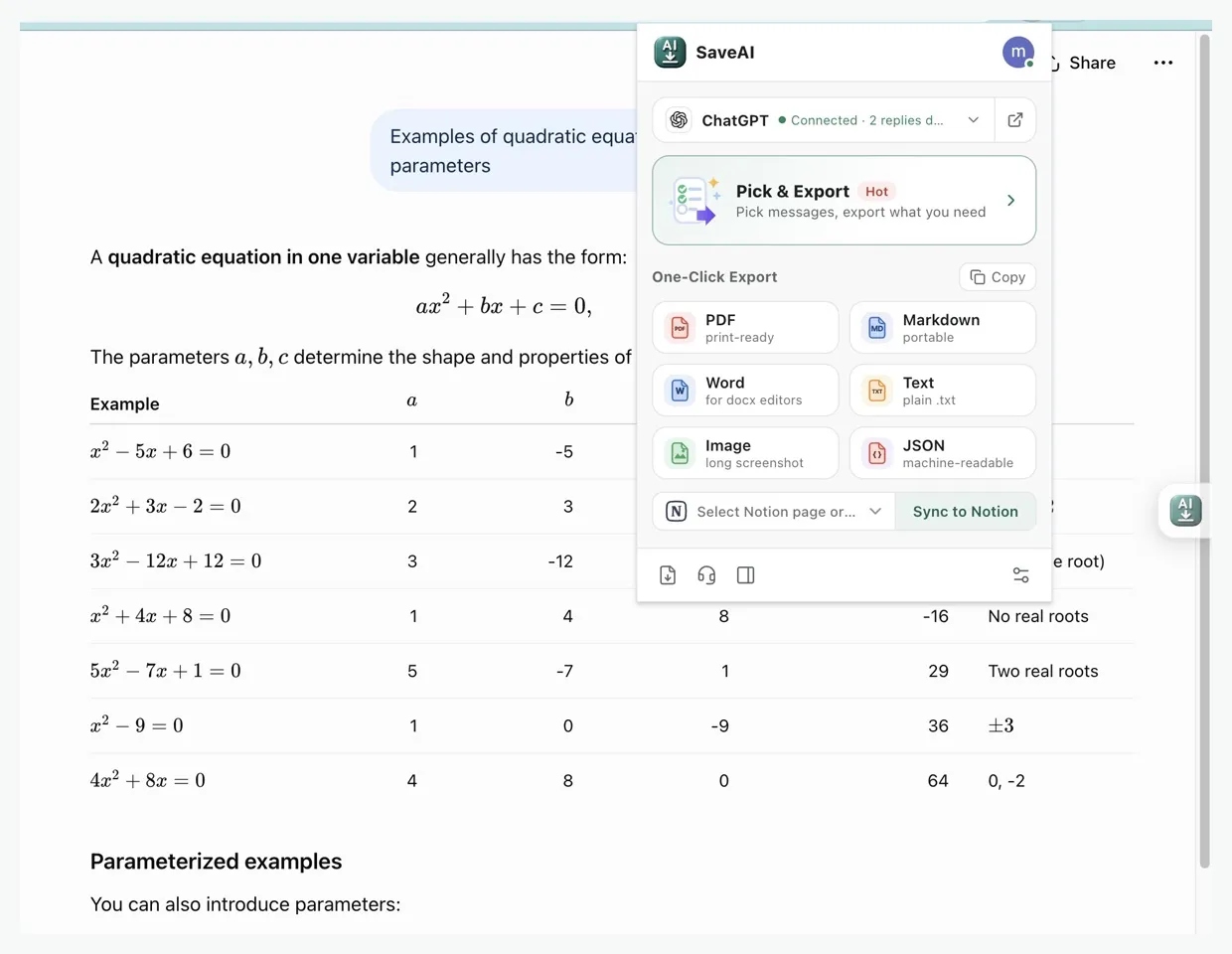
If a destination is missing, check that the connection has access to that page, refresh the list or authorize again. Direct syncing passes through the SaveAI service and Notion API. Choose a Markdown file when you want to inspect and organize locally first.
After import, add your own topic, source, archive date and status properties as needed. Do not assume YAML in Markdown automatically becomes Notion database properties.
5. Add a useful layer above the original conversation
Full-text search helps with a long conversation, but a shorter entry point makes reuse faster. Keep five parts: summary, key conclusions, next actions, source and original text. AI can draft the summary; review it yourself. Keep the full conversation below or in a separate linked note.
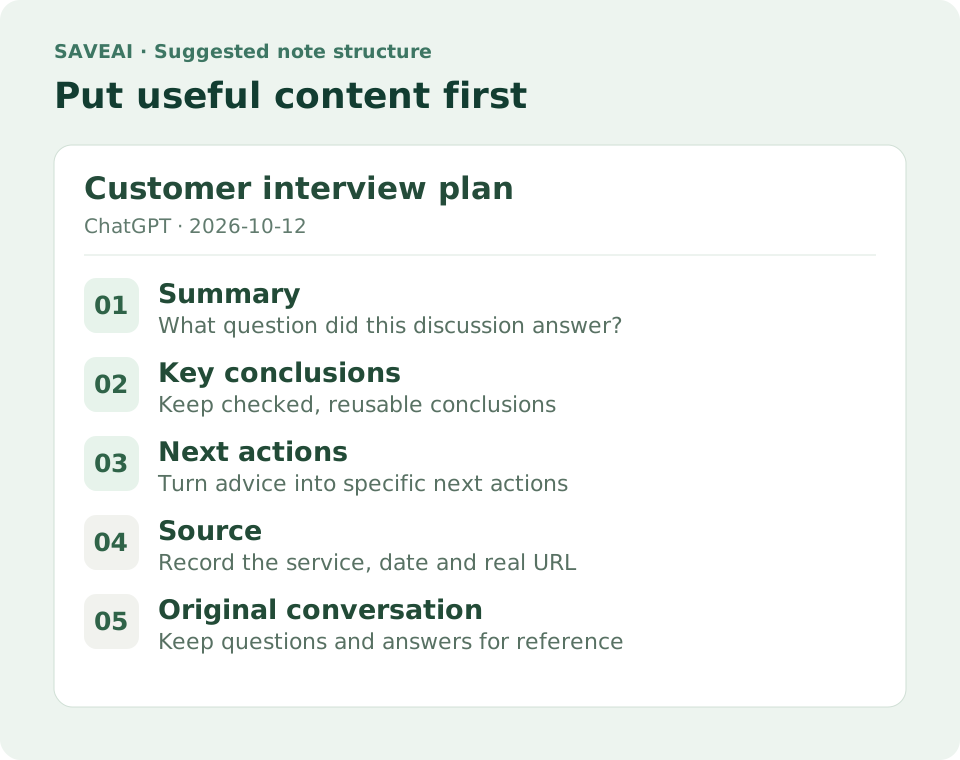
Copy this template into Obsidian, or use the same headings to structure a Notion page.
# Customer interview plan

## Summary
Plan initial customer interviews to understand existing workflows and real pain points.

## Key conclusions
- Ask about specific past events before discussing needs.
- Use follow-up questions to understand the workflow; avoid leading questions.

## Next actions
- [ ] Choose five interviewees
- [ ] Test the question order in one trial interview

## Source
- Platform: ChatGPT
- Archive date: 2026-10-12
- Original conversation link: Paste the real URL here

## Original conversation
Keep the exported questions and answers here
A useful note answers three questions: why did I keep it, what can I use from it, and where can I verify the details? You should not have to reread the conversation from its first turn every time.
6. Three practical starting points
- Study and research: save an explanation, your follow-up questions and references, then link it from the relevant course or topic note. Verify AI-generated claims and citations.
- Debugging: keep environment versions, errors, failed attempts and the working fix. This is more useful than an isolated code snippet when the same problem returns.
- Projects and writing: keep adopted outlines, constraints and decisions with open questions in your project library. Colleagues can read the summary first and consult the original discussion for detail.
7. Common questions after importing
Why are images missing?
Inspect the image references in the Markdown. Remote URLs may expire or require login; relative paths require the note and image files to stay in the right directories. Download important images to your vault’s attachment folder and update the references. In Notion, check that images open properly: a successful import does not prove all attachments were preserved.
Why do code, tables or equations look different?
Rendering depends on the exported content and the destination’s parser. Check code fences, table columns and supported equation syntax. For complex layouts, keep a PDF for comparison and Markdown for editing and search.
Will the saved note keep updating automatically?
Treat each export or sync as a snapshot. Save again after new messages appear. Before reimporting, check for existing notes or pages to avoid duplicates. Date important versions and link to the latest one from your project note.
Should I import everything at once?
Try three frequently used conversations first. Before scaling up, keep the original export and settle your naming, source-link and image workflow. The related guide below explains how to organize a full account export.
What to do after exporting ChatGPT8. Start with one conversation today
Pick a conversation you may need next week, export it as Markdown with SaveAI and put it in Obsidian or Notion. Spend two minutes adding a summary, tags and a next action, then connect it to your current project.
A few days later, see whether you can find it by topic, understand the conclusions quickly and return to the original for detail. If you can, that conversation has become a useful part of your knowledge base.
Ready to start exporting?
SaveAI works on 20 AI sites including ChatGPT, Claude, Gemini. Free to start, local-first.
Install for Chrome Free Install for Edge Free Install for Firefox Free